Quality Data Bay

Compliant - Proficient - Informed

Corrective Action

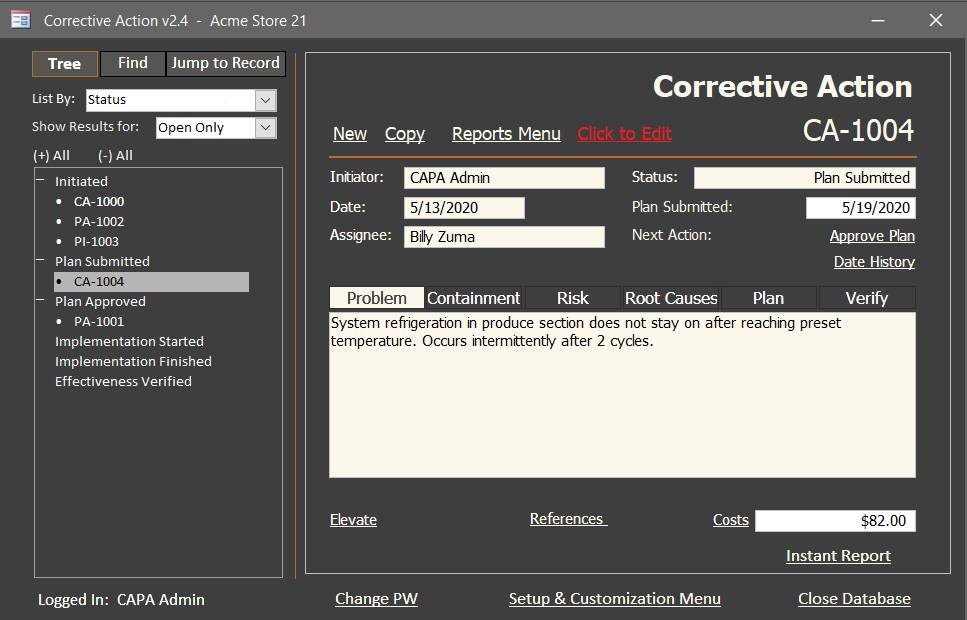
Record corrective actions, process improvements and also preventive actions to improve your processes. Use built in risk assessment and root cause analysis tools to ensure the most correct actions are being determined and implemented.

This software product is in the final stage of development. To learn more about this product, its scheduled release date, or if a beta test version exists, contact Quality Data Bay by registering on our website and submitting a support ticket.

$ 1,195.00

  • Record corrective actions and process improvements.
  • With a database customization checkbox, you can also include the preventive action process.
  • Get to the root causes of system and process non-conforming outputs with familiar and easy-to-use root cause analysis tools (5 Whys, Is/Is Not, and Fishbone).
  • Determine risk level with familiar and easy-to-use risk assessment tools (using a simple risk matrix, or the more advanced Cause and Effect, FMEA, and mini FMEA).
  • Document containment, immediate corrections, root cause analysis, risk assessment, corrective actions, propose how to verify effectiveness, and determine impact to product and finished goods.
  • Act on opportunities realized during audits, management review, customer feedback, and other inputs with process improvement.
  • Make and record process, product, and other improvements.
  • Keep management informed with useful notifications and reports.
  • Record Locking- intentionally lock a record so it cannot be edited.
  • Track the costs to implement a corrective action or process improvement
  • Extend a plan due date with justification and approval
  • Escalate a record to higher level manager to get results
  • Add reference records and data to recall later. Records are hyperlinked for easy access.
  1. Initiate, record problem or issue, and assign to owner
  2. Submit Plan
  3. Approve Plan (requires approval)
  4. Start Implementation
  5. Implementation In-Progress
  6. Implementation Finished
  7. Verify Effectiveness (requires approval)
  8. Review and Close (requires approval)
Searching for a record is easy. In Tree Mode, you can group records by:
  • Status
  • Type
  • Assignee
  • Initiator
  • Plan Due Date
  • Matrix Risk Level
You can choose to show only open records, only open urgent records, closed records, or open and closed records. You can also show records assigned to you and those records you are assigned to approve (My Records). In Find Mode, you can query records by reference number or text string. A reference such as an audit or change order number can be used to group like records to facilitate finding those records later. a text string can also be used to locate a record. For instance, perhaps you validated Widget E years ago and now you need to recall the process improvement record. Type in Validate or Widget E into the Text String field and select the text field labels most likely to contain the text, such as Plan or Verify Effectiveness (your alias could be different). The search results will produce a record list of exact matches. You can filter for open only records, closed only records or all records. The third search type is Jump to Record. Use this feature when you already know the ID number of the record. The database will jump directly to that record.

The following reports can be created from the Reports Menu:
  • Summary Report
  • Problem Report
  • Elevated / Plan Overdue Report
  • Costs Report
  • Audit Trail Report
  • Audit Trail By Approver Report
  • Customization Audit Trail Report
  • Reference Number Report
Report Filters are available to zoom in on only the records you wish to see. The Grouping and Sorting function helps you to organize the data presented in your report. The Save Filter feature allows you to save report queries that are run frequently. It’s easy to Load a saved filter to run a weekly or monthly report.
Built-in customization includes:
  • Setup and Edit Personnel Information
    • Assign permission levels
    • Assign Title and Department
    • Electronic signature
    • Password duration/ reset
    • Includes datasheet view to edit data like a spreadsheet
  • Title Aliases
  • Process Aliases
  • Vital Statistics Aliases
  • Action Numbering to establish record identification numbers
  • Approvals Setup
  • Risk and Root Cause Analysis setup
  • Fiscal year start date
  • Document directory setup
  • Notification setup
  • Export table data to file
Do I need to use the root cause analysis tool?

Reviews

There are no reviews yet.

Only logged in customers who have purchased this product may leave a review.

Related Products